Mezana

Dine-in, beautifully run.

The café POS that takes orders at the table, runs your kitchen, prints GST bills, and keeps billing when the internet doesn’t.

मेज़ · mez · the table

Every café runs on its tables. Mezana keeps each one in order, from the first scan to the final bill, so you can look after your guests instead of your paperwork.

Roz ki 5 tension

Five daily headaches.
One calm counter.

01 · Order

“Order likhne mein galti ho gayi.”

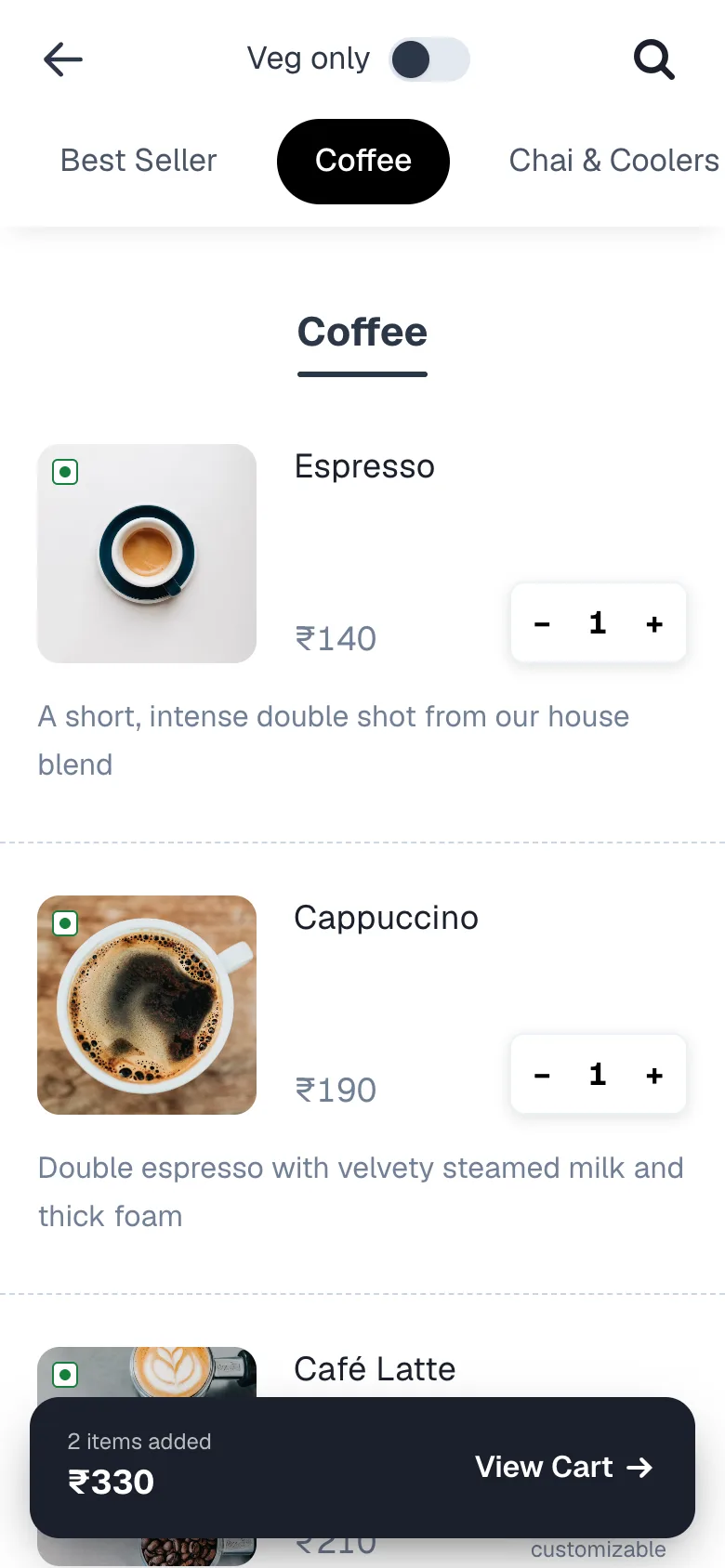
Guests order straight from their table.

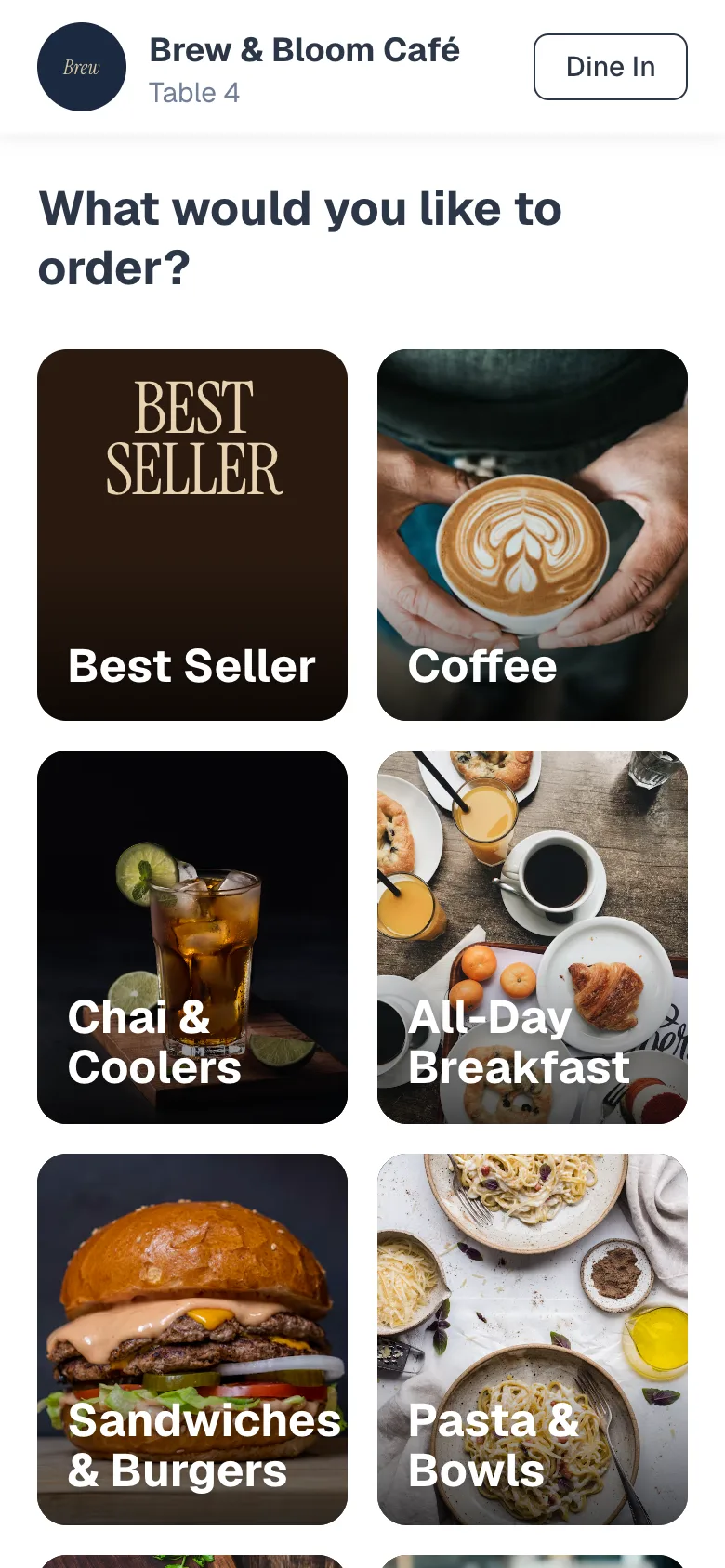
They scan the QR, pick dishes from a menu with photos, choose sizes and add-ons, and add a cooking note. It reaches your counter exactly as they meant it, with their name and number.
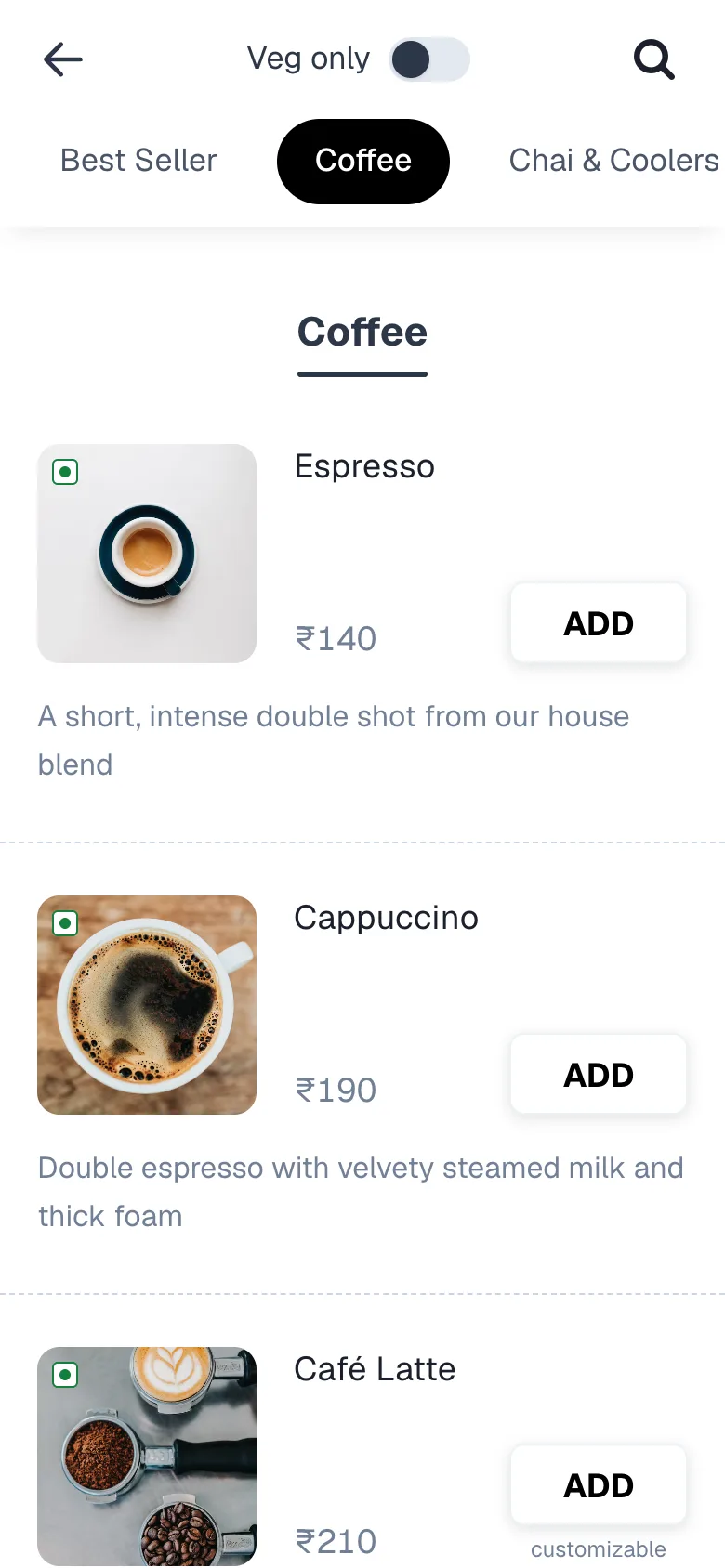
Demo café QR menu on a phone, showing coffees with photos and Add buttons
02 · Kitchen

“Kitchen tak order pahuncha hi nahi.”

One tap, and the kitchen rings.

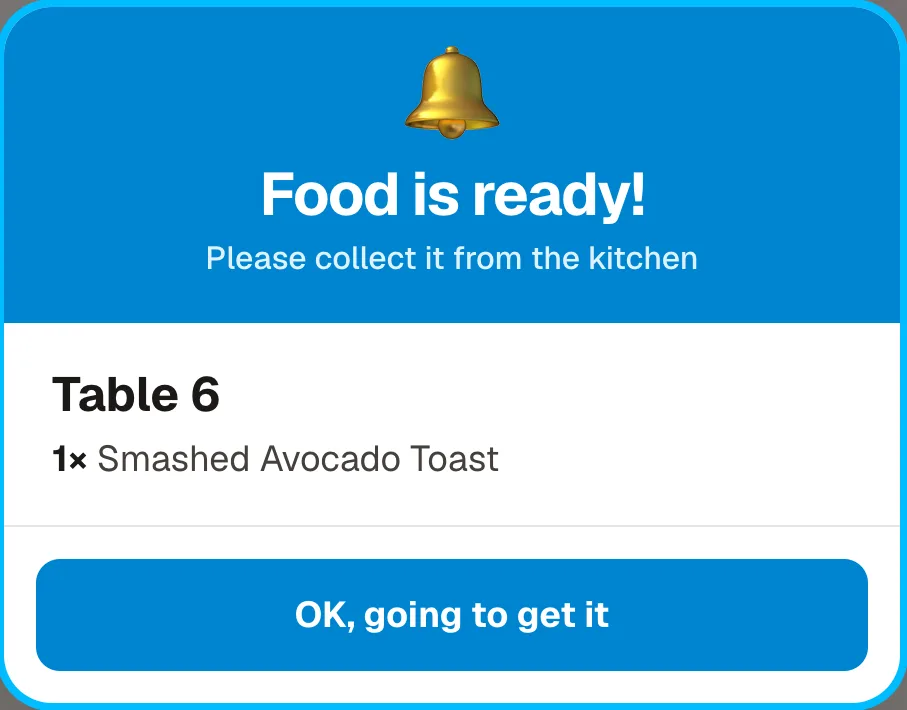
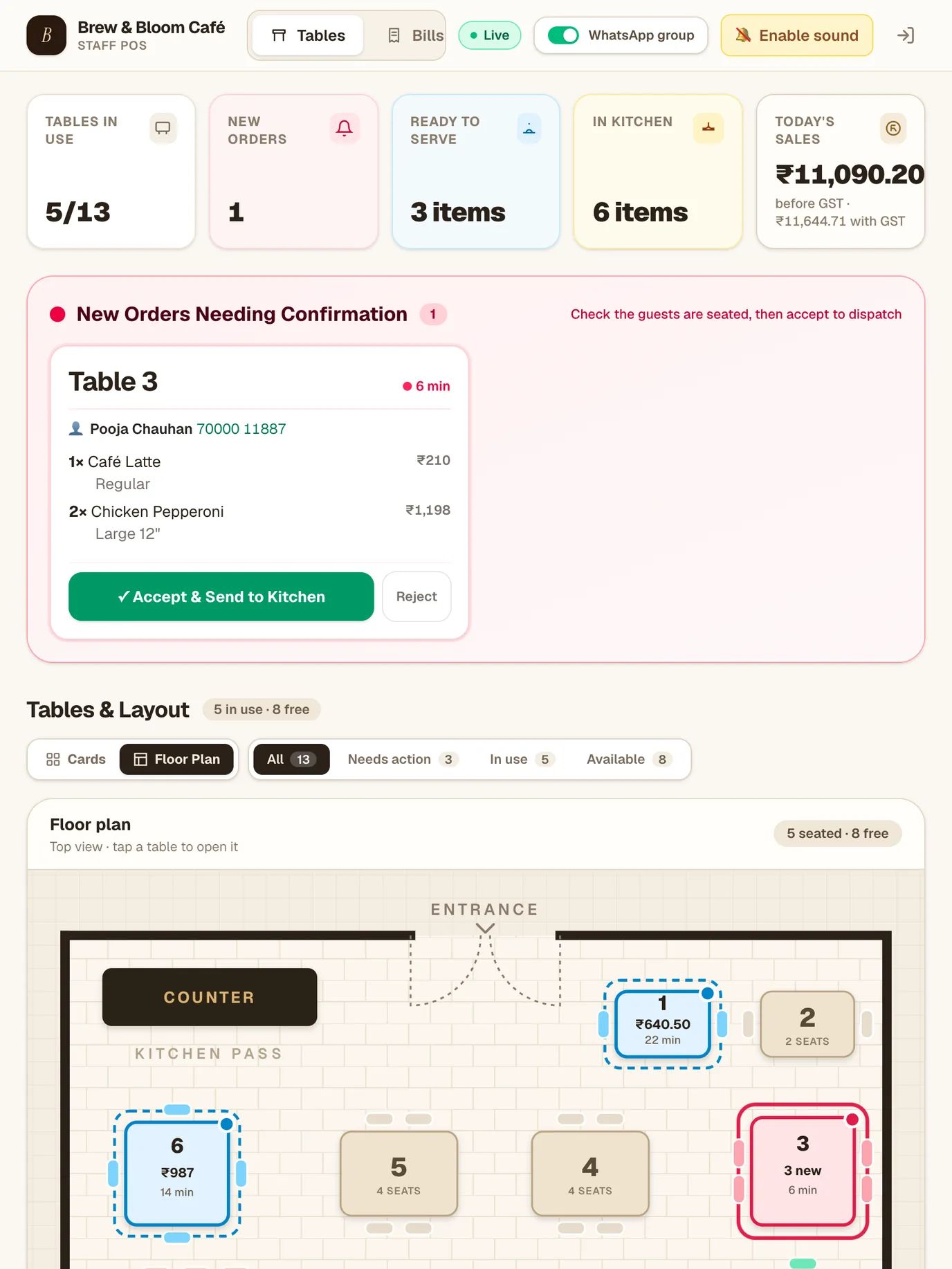
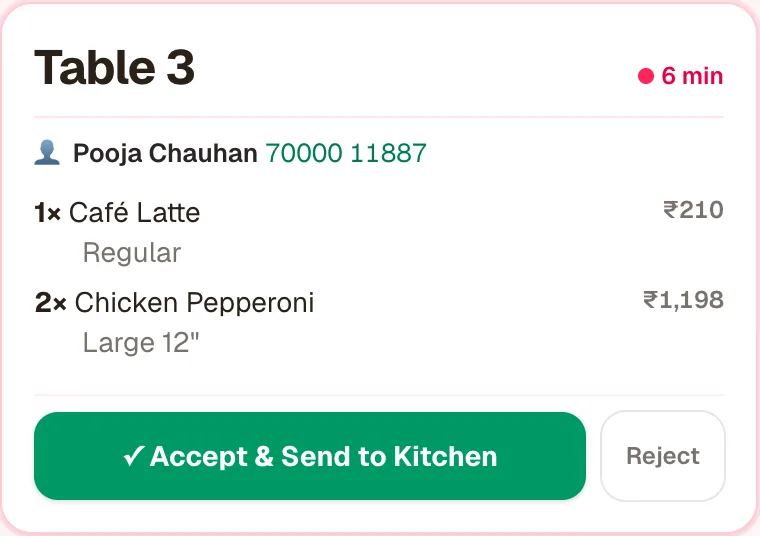
Accept the order and it lands on the kitchen screen with a sound. When the chef marks a dish ready, every staff screen shows Food is ready. A Yes/No check means a stray tap can’t mark it.

New order card for Table 3 with Accept and Send to Kitchen button Food is ready popup for Table 6
03 · Hisaab

“Din ka hisaab milta hi nahi.”

Every rupee adds itself up.

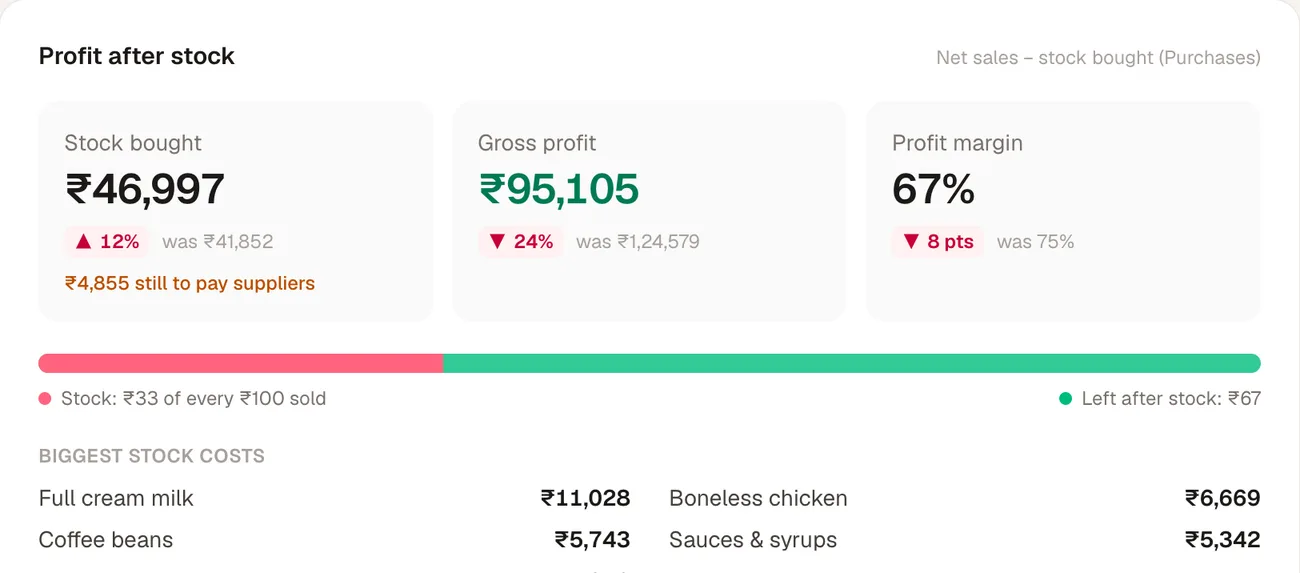
Bills, payments and stock you buy are all in one place. See net sales, profit after stock, your busiest hour and your top dish for today, this month or any dates you pick.

Profit after stock: stock bought, gross profit and profit margin
04 · Offline

“Net gaya, billing band.”

Internet down. Counter still up.

Mezana keeps working on the counter device. Bills keep real invoice numbers, and everything sends itself when the internet comes back.

Offline banner: working on this device, nothing waiting to send
05 · Guests

“Regular aaye, naam yaad nahi.”

Know your regulars by name.

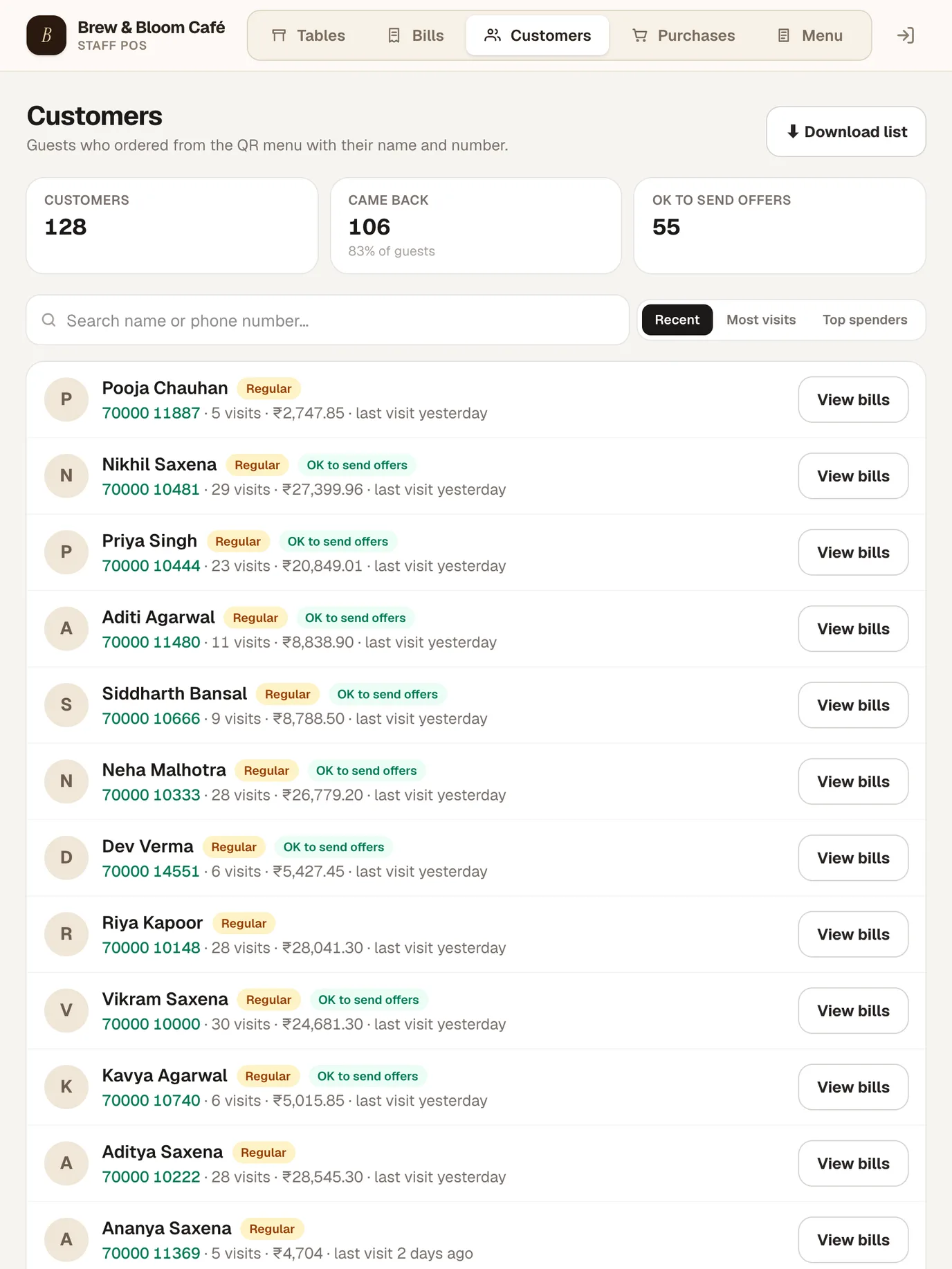
Each QR order saves the guest’s name and number. See who came back, how often, what they spent and who said it’s OK to send them offers.

Customers list with visits, spend and offer consent

How it works

One order,
start to finish.

  1. Scan

    A guest scans the QR card on their table. No app to download.

  2. Order

    They browse your menu, add dishes and send the order.

  3. Counter

    Your counter chimes. Check they’re seated, then accept.

  4. Kitchen

    The kitchen screen rings. Ready dishes pop up for staff.

  5. Bill

    Print a GST bill and take UPI, cash, card or a mix.

The counter

Your whole café,
at a glance.

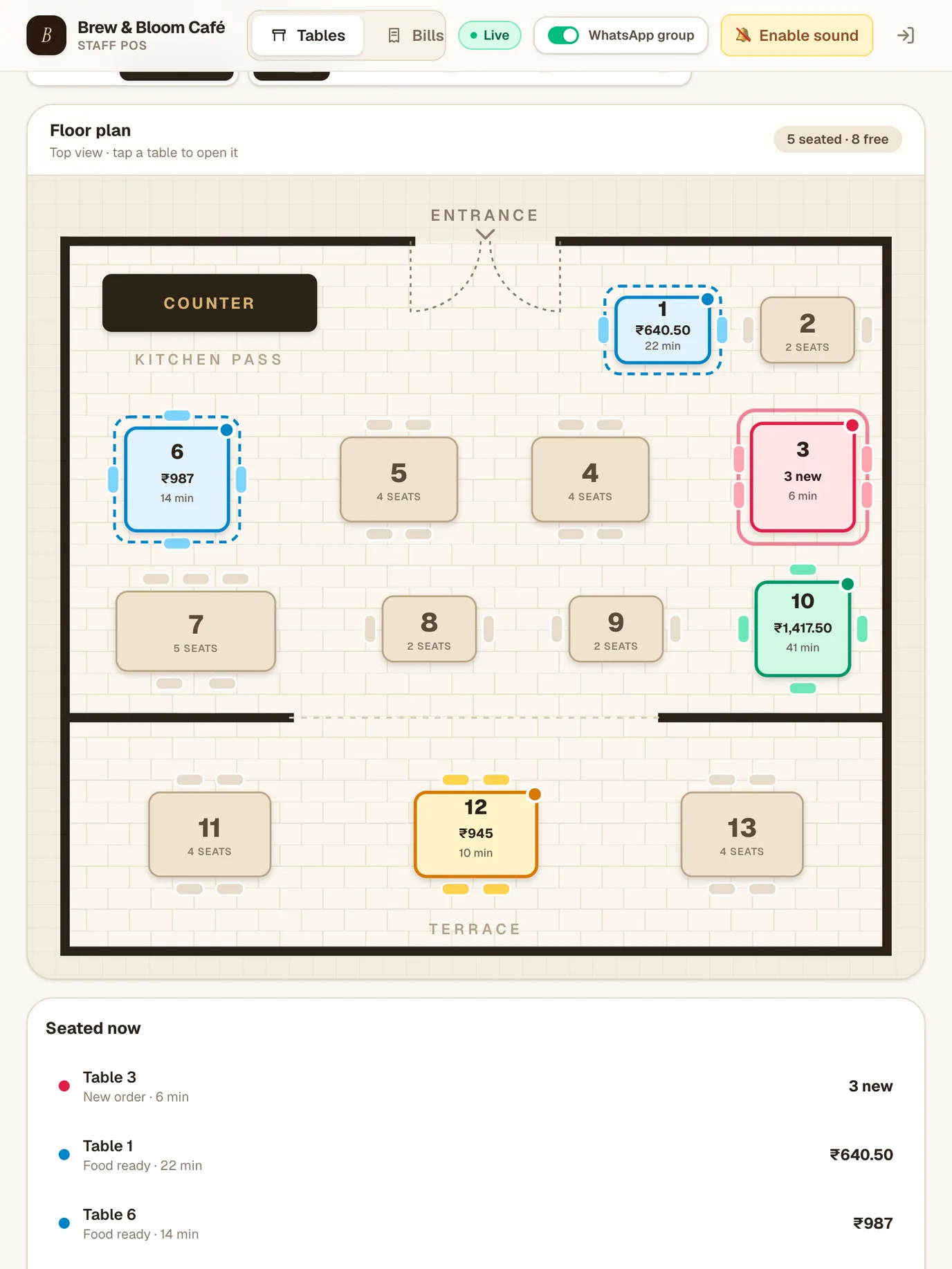
A live floor plan of your tables. Each one shows its bill and how long guests have been seated, in a colour that tells you what to do next.

Live floor plan of the demo café with tables coloured by status New order In the kitchen Food ready Served
  • New order
  • In the kitchen
  • Food ready
  • Served
  • Free

The kitchen

The kitchen
hears it first.

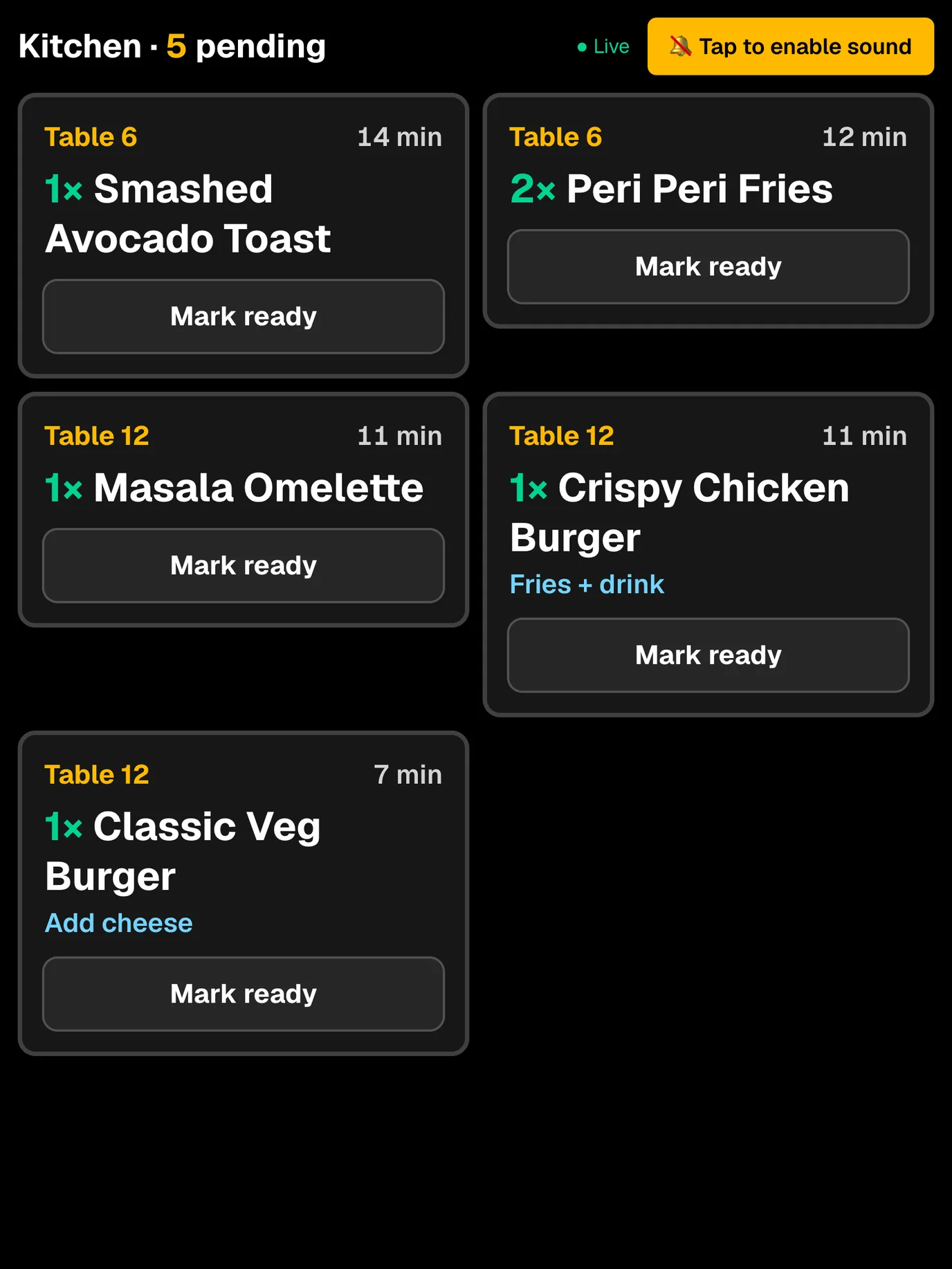
  • Rings on every new order. No more running slips to the pass.
  • Big type, readable from the stove. Table, quantity, options and notes.
  • Yes or No before “ready”. A splash of water can’t send a dish out.
  • WhatsApp, if you want it. Accepting an order can open WhatsApp with the kitchen ticket ready to send to your group.
Kitchen screen with five pending dishes and Mark ready buttons

Payments

UPI. Cash. Card.
Or a bit of each.

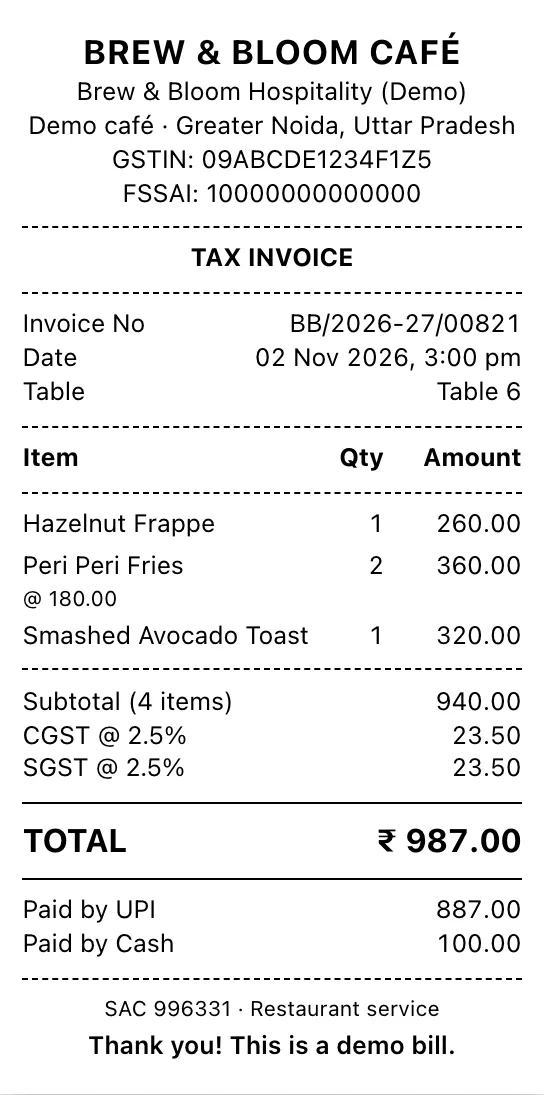
Split one bill across methods in seconds. Mezana checks it adds up to the full amount before it closes the table, and the receipt shows exactly who paid how.

Take payment · Table 6 ₹987.00
  • UPI₹887.00
  • Cash₹100.00
  • Card₹0.00

Adds up to the full bill

Tap a method above to try it.

Tax invoice showing Paid by UPI 887.00 and Paid by Cash 100.00
The receipt lists every method used.

Offline mode

Internet gaya? Billing chalu.

When the Wi-Fi drops, Mezana keeps running on the counter device: take orders, print kitchen slips and bills, and take payment. When it’s back, everything sends itself.

  • Opens with no internet. The counter page and your menu are kept on the device.
  • Real invoice numbers. Each counter gets its own offline series, so a printed bill is final and never clashes.
  • Never doubled. Changes are sent oldest first, and sending one twice can’t create a second bill.
  • Guests can still order. QR orders go through on the guest’s own mobile data.

Hisaab

Know your numbers.
Don’t guess them.

Pick a range (today, yesterday, 7 days, this month or your own dates) and filter by payment, table or time of day. Every number compares itself with the period before.

Net sales₹1,42,102before GST
Profit after stock₹95,105net sales minus stock bought
Average bill₹877per paid bill
Items sold522across 162 bills
Busiest slotTuesdays, 8pm–9pm
Top dishCrispy Chicken Burger · 40 sold
Best pairingClassic Veg Burger + Hazelnut Frappe
Stock: ₹33 of every ₹100 sold Left after stock: ₹67

Figures from our demo café, Brew & Bloom, over 7 days.

Also included

The little things,
done properly.

A menu you control

Categories, sub-categories, photos, sizes, options and add-ons. Change a price and the next guest who scans sees it.

QR menu home with photo categories

GST tax invoices

Your GSTIN and FSSAI, CGST and SGST split, and a clean invoice series for each financial year.

58 mm or 80 mm

Print bills and kitchen slips on the thermal printer at your counter.

QR table cards

Print a card for every table, straight from Mezana.

Veg only, in one tap

Guests can filter the menu to veg dishes and search for anything.

Discounts with a reason

Every discount is shown on the bill and in your Bills list.

Purchases & supplier dues

Log the stock you buy and see what you still owe each supplier.

Move, remove, reprint

Shift guests to another table. Removed dishes stay visible, struck through. Reprint any old bill.

Live on every screen

Counter, kitchen and every staff phone update the moment something changes.

No new hardware

Runs in the browser on the phones, tablets and laptops you already have.

Your data, walled off

Each café’s data is separated by the database itself. Prices are checked on our server, never taken from a guest’s phone.

The 49-second tour

Rather watch
than read?

Five problems, five answers, in Hinglish. Turn the sound on.

Getting started

Live in three steps.

  1. १

    Book a free demo

    Message us on WhatsApp. We’ll show you Mezana running a real café counter, on your own phone.

  2. २

    We set it up with you

    Your menu, tables, bill details and logins, ready before your first service.

  3. ३

    Put the QR cards out

    Print a card for each table and start taking orders. That’s it.

Questions

Good to know.

Do I need to buy new hardware?

No. Mezana runs in the browser on the phones, tablets and laptops you already have. For printed bills, use a 58 mm or 80 mm thermal printer connected to your counter device.

What happens when the internet goes down?

The counter keeps working on its device. You can add dishes, accept QR orders already on screen, print kitchen slips and bills, and take payment. Bills keep real invoice numbers. When the internet is back, everything is sent in order, and nothing is ever doubled.

Do guests have to download an app?

No. They scan the QR card on their table and the menu opens in their phone’s browser.

Do guests pay on their phone?

No. Guests order from their phone and pay at the counter as they do today, by UPI, cash, card or a mix of these.

Can I change my menu and prices myself?

Yes. From the Menu page you can add dishes, photos, categories, sizes, options and add-ons, and change prices. The next guest who scans sees the new menu.

Are the bills GST-ready?

Yes. Mezana prints tax invoices with your GSTIN and FSSAI number, CGST and SGST shown separately, and an invoice number series for each financial year.

Is my café’s data safe?

Each café’s orders, bills and guest list are walled off from every other café by the database itself, and each login belongs to one café only. Prices are always taken from your menu on our server, never from the guest’s phone.

How much does it cost?

It depends on the size of your café. Message us on WhatsApp and we’ll give you a straight answer, along with your free demo.

Your tables
are waiting.

चलिए, शुरू करते हैं।